Wednesday, October 15, 2008

Changing HTC Shift integrated BD_ADDR

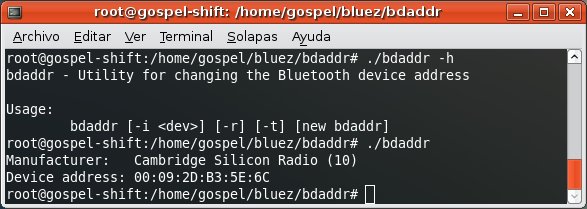
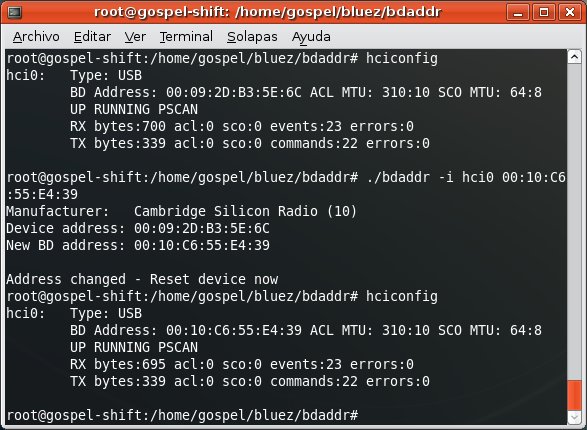
There's a great tool called bdaddr that allows you to change the BD_ADDR, the physical address, in your Bluetooth adapter. It works with Ericcson, Cambridge Silicon Radio and Zeevo chipsets.


I'm glad to know that the HTC Shift comes with a CSR integrated chipset, so i'm able to change its BD_ADDR.


After changing the address, you need to turn the hci0 interface down and sometimes even plug the dongle out and in again so changes are applied.

You can get the code of bdaddr here and you can find the tool ready to Make here, since it's not included in the last bluez-utils package shipped with Ubuntu.

Monday, October 6, 2008

Sending / Getting files from mobile phones

The capability of sending files and even getting files is another important goal when it comes to attack mobile phones. Bluetooth supports file exchange through the OBEX protocol. Two profiles can be used for this, among all defined by the Bluetooth SIG:
  • Object Push Profile: requires Authorization.
  • File Transfer Profile: requires Authentication and Authorization.
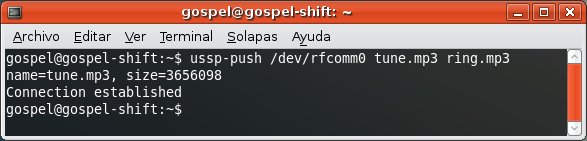
Object Push Profile: allows you to send files.


You can use ussp-push tool, available after installing ussp-push package in Ubuntu.


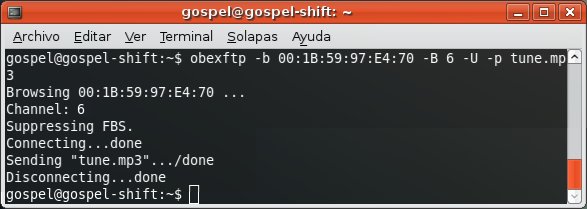
Or either you can use Obexftp, available after installing obexftp package in Ubuntu.


It's important to force it to use the channel associated to the Object Push Profile.

File Transfer Profile
: allows you to send files, get files and list directories.


You can use Obexftp to send files. If no channel is specified, it will use the one associated to the File Transfer Profile by default.


You can also list directories and browse through them.


Finally, you can get files from the phone to the PC.


I remember the old openobex-apps package for Fedora used to include the obex_push tool, but it's no longer needed since you can use Obexftp and force it to use the channel associated to Object Push Profile.

Saturday, October 4, 2008

Sending AT commands to mobile phones

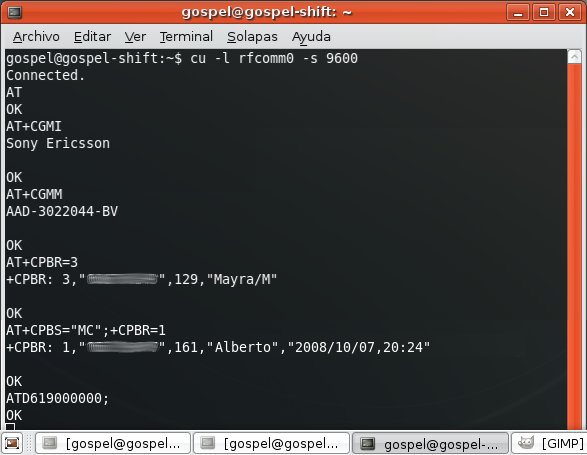
The execution of AT commands is one of the main goals in hypothetical attacks to mobile phones. AT commands are a set of instructions that allow remote configuration and operation in a GSM device, such as mobile phones. Like a "remote shell". However, not all the AT commands are always implemented by manufacturers in their devices. I divide them in 3 groups:
  • Basic operations: voice and data calls, set call divert, manufacturer info, model info, IMEI, battery status, signal status.
  • Address book operations: read, add and delete contacts from the address book and also get the last dialed/missed/received calls list.
  • SMS operations: list, read, write, send and delete SMS messages.
Each of these groups may or may not be implemented by manufacturers. Usually, the basic operations group is.


AT commands can be sent to a mobile phone through the Dial Up Networking Bluetooth service. A link to that service requires authentication and authorization, so both devices must be paired up and the phone user must have accepted a connection attempt from the box.

In order to pair Ubuntu with any other Bluetooth device, the /etc/bluetooth/hcid.conf file must be configured properly. The standard configuration in Ubuntu works fine:

#
# HCI daemon configuration file.
#

# HCId options
options {
# Automatically initialize new devices
autoinit yes;

# Security Manager mode
# none - Security manager disabled
# auto - Use local PIN for incoming connections
# user - Always ask user for a PIN
#
security user;

# Pairing mode
# none - Pairing disabled
# multi - Allow pairing with already paired devices
# once - Pair once and deny successive attempts
pairing multi;

# Default PIN code for incoming connections
passkey "1234";
}

# Default settings for HCI devices
device {
# Local device name
# %d - device id
# %h - host name
name "%h-%d";

# Local device class
class 0x000100;

# Default packet type
#pkt_type DH1,DM1,HV1;

# Inquiry and Page scan
iscan enable; pscan enable;
discovto 0;

# Default link mode
# none - no specific policy
# accept - always accept incoming connections
# master - become master on incoming connections,
# deny role switch on outgoing connections
lm accept;

# Default link policy
# none - no specific policy
# rswitch - allow role switch
# hold - allow hold mode
# sniff - allow sniff mode
# park - allow park mode
lp rswitch,hold,sniff,park;
}


Using this configuration, the system will prompt an applet asking the user to confirm the PIN when the pairing process takes place.
This is because the security user; option tells Ubuntu to interact with the gnome desktop environment. If security auto; option is set, then Ubuntu will execute the line passkey "1234";. This action can be changed by other PIN helpers like the old bluepin Python script, just by installing it and including its path pin_helper /???/bluepin; instead.

How to send AT commands to a mobile phone

First, you need to discover the mobile phone and get the channel associated to the Dial Up Networking service.


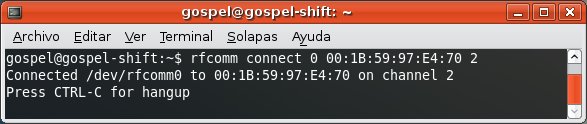
After, you can connect with rfcomm connect 0 BD_ADDR DUN_channel.


The link to Dial Up Networking service will require authentication and authorization between the mobile phone and the box.

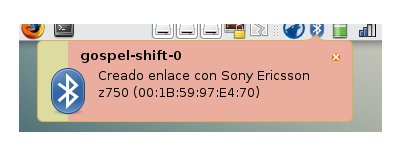
If both devices haven't been paired up yet, the pairing process (authentication) will start. The phone will require the user to insert a PIN, that PIN must be confirmed in Ubuntu and the system will display that both devices are paired.
If the Ubuntu box is not included in the list of trusted-devices in the mobile phone (a previous connection is needed for that), it will require the user to accept the connection (authorization) to the Bluetooth service.

Now the RFCOMM link has been successfully established, AT commands can be sent to the phone using the cu tool, included in the Taylor UUCP package.

Friday, October 3, 2008

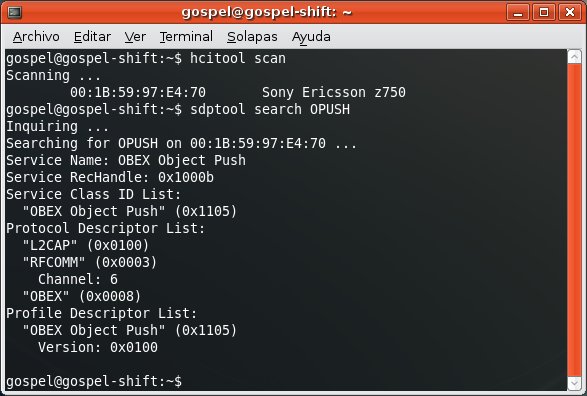
Discovering Bluetooth devices and services

Latest Linux distributions install by default the bluez-utils package. Among all the useful tools included within the package, you can find these two:
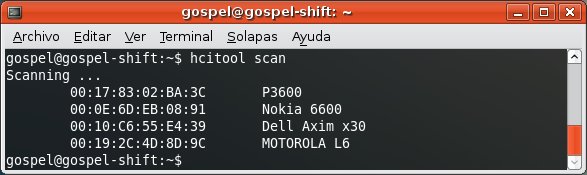
  • Hcitool: Remote Bluetooth devices discovery, name resolution, class identification.

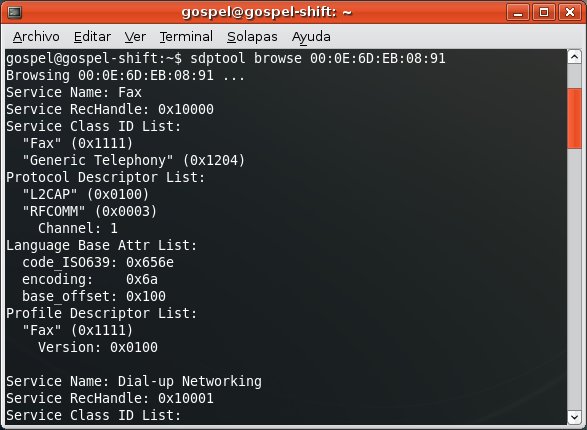
  • Sdptool: Service Discovery Protocol management, Bluetooth services discovery.

Enumerating the services supported by certain remote device.


Searching for remote devices that support Dial Up Networking Bluetooth service.


Searching for remote devices that support OBEX FTP Bluetooth service.

Thursday, October 2, 2008

I got the Shift

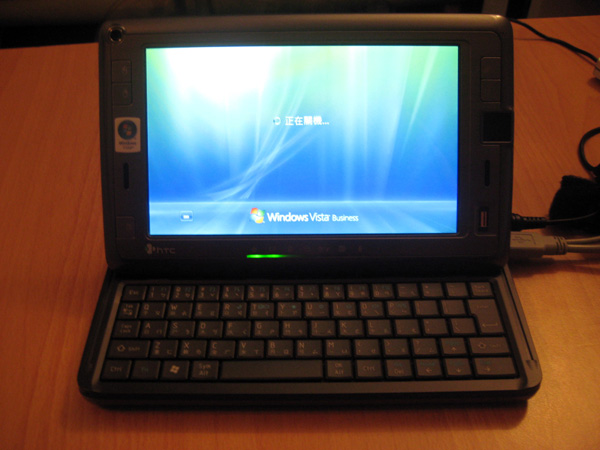
I just got myself an HTC Shift a month ago. I bought it during a trip to Taipei, around 250€ cheaper than in Spain. But there were 4 inconveniences:
  • Windows Vista Business in traditional Chinese language.
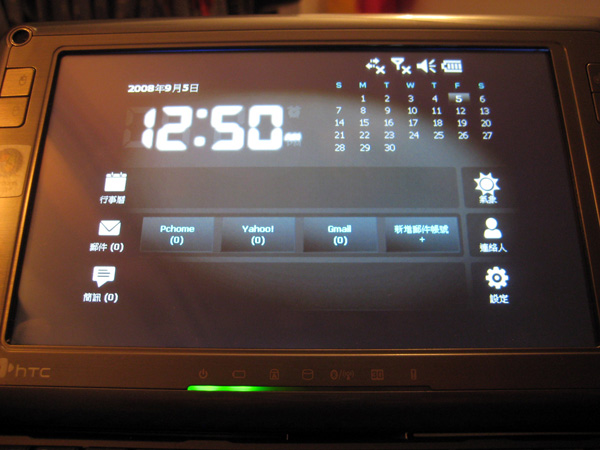
  • SnapVUE (limited Windows Mobile) in traditional Chinese language.
  • Regional warranty.
  • No 'ñ' character nor accent marks.
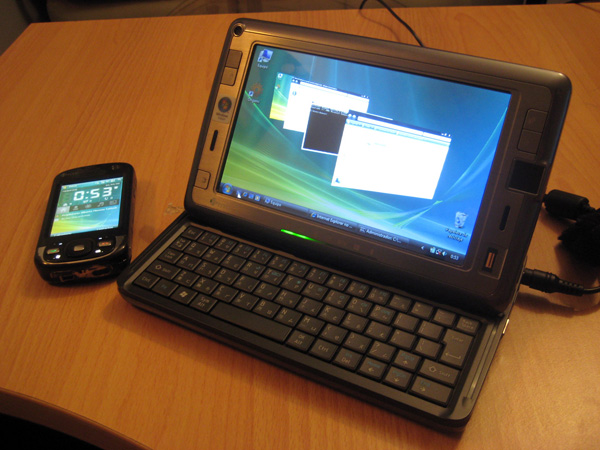
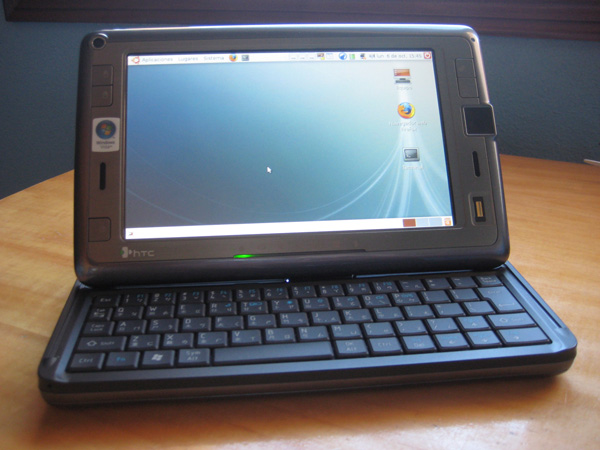
Nevertheless, i succeeded in changing the language in both OS as well as installing Ubuntu Linux, so now i have an UMPC with the following features:
  • Windows Vista Business in Spanish.
  • Ubuntu Linux 8.04 in Spanish.
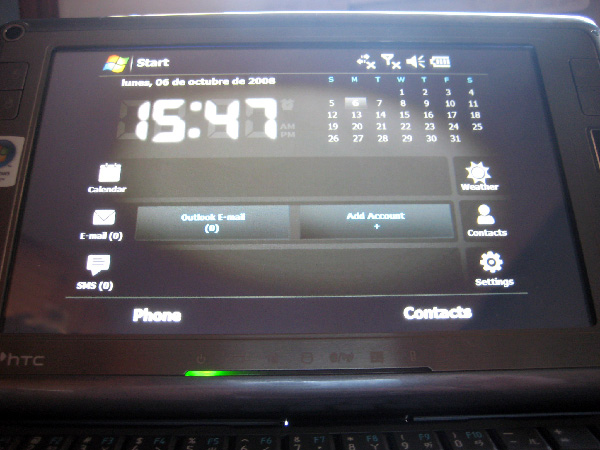
  • Windows Mobile 6 custom ROM in English.
Not bad. Here is how i did it...

1. Switching Windows Vista language

Although i first thought it was impossible to install a language pack in Windows Vista Business Edition (only in Ultimate Edition) i followed this workaround and was able to install Windows Vista MUI Spanish language pack and switched from traditional Chinese language successfully.


Once i could use Windows Vista properly (i'm not good at traditional Chinese) i created a partition for Ubuntu Linux with the Disk Management tool.

2. Installing Ubuntu Linux

It wasn't hard to install Ubuntu Linux 8.04 in the HTC Shift using a portable USB CD reader, although it could also have been done from an image stored in an USB Pendrive. Most of the hardware worked out of the box:
  • Audio
  • Ethernet
  • Bluetooth
  • SD Card
  • Webcam
And thanks to pof, a simple script automatically configured the remaining stuff:
  • Touchscreen
  • WiFi
  • 3G
Easy as pie.


3. Switching Windows Mobile language

SnapVUE (limited Windows Mobile) also displayed traditional Chinese language, completely unintelligible (for me).


Switching the language in Windows Mobile can't be done, unlike Windows Vista, so i was forced to install a new ROM. Unfortunately, HTC hasn't published the official SnapVUE ROM yet (though other HTC Phones official ROMs are available at HTC's website) so i had to:
  1. Unlock Windows Mobile File Explorer
  2. HardSPL the HTC Shift
  3. Install a custom ROM
Surprisingly, this ROM i installed activated GPS function in SnapVUE side too. From now on, i can install other custom ROMs that may activate SD card, phone, Bluetooth and WiFi on SnapVUE. That'd be great.


Finally i got the perfect system for Mobile Security pentest, all in less than 1 Kg! Now let's see what it's capable of... :)

Wednesday, October 1, 2008

Here i go

I'm back in business ;)

Tuesday, November 27, 2007

Estado del arte de los Ataques a Manos Libres Auriculares

El pasado Octubre, durante el evento SANS NS2007 en Las Vegas, Joshua Wright realizó una presentación sobre Seguridad en Bluetooth dirigida fundamentalmente a mostrar el estado del arte de los ataques a Manos Libres, que parece ser la línea de investigación en la que se está centrando últimamente.

En su entrada del blog sobre el evento, recoge algunas experiencias interesantes atacando diferentes modelos de Manos Libres:

- El Manos Libres Jawbone parece que acepta solicitudes de emparejamiento de cualquier equipo aunque el dispositivo no se encuentre en modo visible (discoverable). Para ello, es necesario conocer su dirección BD_ADDR. Si el dispositivo está en modo oculto (non discoverable) no podrá ser descubierto con un HCI inquiry y puede llevarse a cabo un ataque de fuerza bruta sobre un rango de direcciones BD_ADDR con Redfang para poder detectarlo e intentar el emparejamiento una vez conocida la BD_ADDR. Simple. Es interesante porque el Jawbone es supuestamente el mejor equipo Manos Libres del mercado, basado en tecnología militar para filtrar acústicamente el ruido de ambiente, y toda la gente guay tiene uno. La demo del producto es impresionante.

- Los Manos Libres Motorola y Jabra, a pesar de no estar basados en tecnología militar son más seguros. :P No aceptan solicitudes de emparejamiento de dispositivos desconocidos a menos que el equipo se encuentre en modo visible (discoverable), para lo cual suele ser necesario apretar una combinación de botones. Sin embargo, en modo oculto (non discoverable), aceptan solicitudes de re-emparejamiento con dispositivos con los que anteriormente se han emparejado, es decir, dispositivos conocidos. Por tanto, se deduce que llevando a cabo un ataque BD_ADDR Spoofing de primer nivel y suplantando la dirección BD_ADDR del teléfono móvil con el que usualmente se comunica el Manos Libres, el atacante estaría en disposición de emparejarse con el dispositivo y acceder a sus funciones de audio. Sólo hace falta suplantar la dirección BD_ADDR de un dispositivo conocido, no hace falta suplantar la clave de enlace compartida ya que se genera una nueva tras el emparejamiento, así que el ataque Blue MAC Spoofing es sencillo de ejecutar.

En ambos casos, recuerdo que para poder emparejarse pasivamente con el Manos Libres el atacante debe conocer el PIN por defecto implantado en este dispositivo, algo fácil de saber consultando el manual del fabricante.

Una vez conocido el PIN, el atacante se empareja con el Manos Libres (siempre que este esté encendido pero no en uso con un teléfono móvil en ese momento) y puede acceder a las funciones de audio, con capacidad para:

- Capturar el audio recogido por el micrófono del dispositivo
- Inyectar audio que sería reproducido por el auricular

Esta es la demo que llevó a cabo Josh en el evento SANS NS2007. Podéis descargaros la presentación original desde aquí o con anotaciones desde aquí.